Computer Science and Applications (subject to change)
- Computer Science and Applications Assignments
- CodeHS
- Typing
- Quizlet
- Student Sites
- Google Classroom
- Syllabus
If you redo an assignment or makeup a missing assignment, you must email me to submit it. Assignments must be submitted one at a time. Use the assignment names from the assignments listed below as the subject. Your emails to me must use a subject and at least attempt to follow the basic rules of English. Turn on spell check and Grammarly. Your communication to me is not a text or a comment on social media.
April 30
Google Slides 4.3 In Google Classroom
- This assignment will post during class.
- Read the directions in the PDF.
- Use the provided Google Slide; do not create your own.
- DO NOT PRINT.
- DO NOT SHARE.
- Turn in the assignment when done.
April 29
Typing.com
- Type for 10 minutes at the beginning of the period.
- Up to 5 points of extra credit for typing longer than 10 minutes.
- Remember to login with your school Google account, it tracks your time. If you are not logged into the class you WILL NOT receive credit.
Google Slides 4.3 In Google Classroom
- This assignment will post during class.
- Read the directions in the PDF.
- Use the provided Google Slide; do not create your own.
- DO NOT PRINT.
- DO NOT SHARE.
- Turn in the assignment when done.
April 28
Google Slides 4.2 In Google Classroom
- This assignment will post during class.
- Read the directions in the PDF.
- Use the provided Google Slide; do not create your own.
- DO NOT PRINT.
- DO NOT SHARE.
- Turn in the assignment when done.
April 27
Google Slides 4.1 In Google Classroom
- This assignment will post during class.
- Read the directions in the PDF.
- Use the provided Google Slide; do not create your own.
- DO NOT PRINT.
- DO NOT SHARE.
- Turn in the assignment when done.
April 24
Typing.com
- Type for 15 minutes at the beginning of the period.
- Up to 5 points of extra credit for typing longer than 15 minutes.
- Remember to login with your school Google account, it tracks your time. If you are not logged into the class you WILL NOT receive credit.
Lesson 4.1 In Google Classroom
- This assignment will post during class.
- Read the directions in the PDF.
- Use the provided Google Slide; do not create your own.
- DO NOT PRINT.
- DO NOT SHARE.
- Turn in the assignment when done.
April 23
Google Sheets GS AND Function
- This is the first part of the AND Function assignment.
- Use the directions from https://www.w3schools.com/
- Complete the work using the provided sheet in Google Classroom.
Google Sheets GS AND Function (with IF)
- This is the second part of the AND Function assignment above.
- Use the directions from https://www.w3schools.com/
- Complete the work using the provided sheet in Google Classroom.
Google Sheets COUNTIF Function
- Use the directions from https://www.w3schools.com/
- Complete the work using the provided sheet in Google Classroom.
Google Sheets IF Function
- This is the first part of the IF Function assignment.
- Use the directions from https://www.w3schools.com/
- Complete the work using the provided sheet in Google Classroom.
Google Sheets IF Function (greater than)
- This is the second part of the IF Function assignment above.
- Use the directions from https://www.w3schools.com/
- Complete the work using the provided sheet in Google Classroom.
April 22
Google Sheets GS Single Color Formatting
- Use the directions from https://www.w3schools.com/
- Complete the work using the provided sheet in Google Classroom.
Google Sheets GS Color Scale Formatting
- Use the directions from https://www.w3schools.com/
- Complete the work using the provided sheet in Google Classroom.
April 21
Google Sheets Relative References
- Create and account at https://www.w3schools.com/
- Use your school Google account.
- Use the directions from https://www.w3schools.com/
- Complete the work using the provided sheet in Google Classroom.
Google Sheets Absolute References
- Use the directions from https://www.w3schools.com/
- Complete the work using the provided sheet in Google Classroom.
Google Sheets Multiplication Operator
- Use the directions from https://www.w3schools.com/
- Complete the work using the provided sheet in Google Classroom.
Google Sheets Sort by Range
- Use the directions from https://www.w3schools.com/
- Complete the work using the provided sheet in Google Classroom.
April 20
Lesson 3.6 In Google Classroom
- This assignment will post during class.
- Read the directions in the PDF.
- Use the provided Sheet; do not create your own.
- DO NOT PRINT.
- DO NOT SHARE.
- Turn in the assignment when done.
April 17
Missing work and Lesson 3.5 In Google Classroom
April 16
Lesson 3.5 In Google Classroom
- This will be divided into two grades. One for the pie chart and the other for the column chart.
- This assignment will post during class.
- Read the directions in the PDF.
- Use the provided Sheet; do not create your own.
- DO NOT PRINT.
- DO NOT SHARE.
- Turn in the assignment when done.
April 15
Missing Assignments report
April 14
DUE: Lesson 3.3 In Google Classroom
Lesson 3.4 In Google Classroom
- This assignment will post during class.
- Read the directions in the PDF.
- Use the provided Sheet; do not create your own.
- DO NOT PRINT.
- DO NOT SHARE.
- Turn in the assignment when done.
April 13
Lesson 3.3 In Google Classroom
- Read the directions in the PDF.
- Use the provided Sheet; do not create your own.
- DO NOT PRINT.
- DO NOT SHARE.
- Turn in the assignment when done.
Apr 3
Lesson 3.2 In Google Classroom
- Read the directions in the PDF.
- Use the provided Sheet; do not create your own.
- DO NOT PRINT.
- DO NOT SHARE.
- Turn in the assignment when done.
Apr 1
NO GAMES. THERE IS ENOUGH WORK TO KEEP YOU BUSY
Typing.com
- Type for 15 minutes at the begninning of the period.
- Up to 5 points of extra credit for typing longer than 15 minutes.
- Remember to login with your school Google account, it tracks your time. If you are not logged into the class you WILL NOT receive credit.
Lesson 3.1 In Google Classroom
- Read the directions in the PDF.
- Use the provided Sheet; do not create your own.
- DO NOT PRINT.
- DO NOT SHARE.
- Turn in the assignment when done.
Mar 27-31
Canva Visual Suite
- Go to Google Classroom for link.
- Do not scan the QR code in Lesson 3.
- Please go through each video and activity and complete the work in them. There will be a quiz.
- When you are done with each activity within a lesson, use the Send to teacher option.
- As you complete each lesson, click Finish Lesson to proceed to the next lesson.
Mar 25-26
Canva Course Creating a logo
- Go to Google Classroom for link.
- This is being assigned as an entire course within Canva rather than individually
- Please go through each video and activity and complete the work in them.
- We have not submitted work in this manner, so please be patient if there nare some issues that arise.
- When you are done with each activity within a lesson, use the Send to teacher option.
- As you complete each lesson, click Finish Lesson.
Mar 24
Another new seating chart based on sub report.
DUE all work from yesterday
Mar 23
NO GAMES. THERE IS ENOUGH WORK TO KEEP YOU BUSY
Typing.com
- Type for 15 minutes at the beginning of the period.
- Up to 5 points of extra credit for typing longer than 15 minutes.
- Remember to login with your school Google account, it tracks your time. If you are not logged into the class you WILL NOT receive credit.
Canva Lesson 9 Video Tints and shades (2 min)
- This is scheduled to post to Google Classroom.
- Due Today
Canva Lesson 9 Activity Color relationships
- This is scheduled to post to Google Classroom.
- Submit using send to teacher in Canva.
- Due Today
Canva Lesson 10 Video Color Combinations (2 min)
- This is scheduled to post to Google Classroom.
- Due Today
Canva Lesson 11 Video Choosing photos that work (2 min)
- This is scheduled to post to Google Classroom.
- Due Today
Canva Lesson 11 Activity Marrying text and Images
- This is scheduled to post to Google Classroom.
- Submit using send to teacher in Canva.
- Due Today
Canva Lesson 12 Video Sharing and publishing your designs (2 min)
- This is scheduled to post to Google Classroom.
- Due Today
Canva Design Assessment
- The requirements will post in Google Classroom.
- Use the images below.
- To Submit.
- Download as a JPG.
- Attache the file to an email to me with the subject Canva Graphic.
- Due Tomorrow


Mar 20
Last Day of the quarter
New Seating Chart
- Make a new friend
Canva Lesson 6 Video Pairing fonts effectively (2 min)
- This is scheduled to post to Google Classroom.
- Submit using send to teacher in Canva.
- Due Today
Canva Lesson 6 Activity Font pairing basics
- This is scheduled to post to Google Classroom.
- Submit using send to teacher in Canva.
- Due Today
Canva Lesson 7 Video Creating impactful designs (2 min)
- This is scheduled to post to Google Classroom.
- Submit using send to teacher in Canva.
- Due Today
Canva Lesson 7 Activity Harnessing Hierarchy
- This is scheduled to post to Google Classroom.
- Submit using send to teacher in Canva.
- Due Today
Canva Lesson 8 Color wheel basics (2 min)
- This is scheduled to post to Google Classroom.
- Submit using send to teacher in Canva.
- Due Today
Canva Lesson 8 Color relationships
- This is scheduled to post to Google Classroom.
- Submit using send to teacher in Canva.
- Due Today
Mar 19
Canva Lesson 4 Video aligning elements for balance (2 min)
- This is scheduled to post to Google Classroom.
- Submit using send to teacher in Canva.
- Due Today
Canva Lesson 4 Activity The effect of alignment
- This is scheduled to post to Google Classroom.
- Submit using send to teacher in Canva.
- Due Today
Canva Lesson 5 Video Choosing the right font (1 min)
- This is scheduled to post to Google Classroom.
- Submit using send to teacher in Canva.
- Due Today
Canva Lesson 5 Activity Choosing the right font
- This is scheduled to post to Google Classroom.
- Submit using send to teacher in Canva.
- Due Today
Mar 18
All work for the quarter is due
Credit for being on task today
- No Youtube
- No games
- No Phones
- Just work
Typing.com
- Type for 10 minutes at the beginning of the period.
- Up to 5 points of extra credit for typing longer than 10 minutes.
- Remember to login with your school Google account, it tracks your time. If you are not logged into the class you WILL NOT receive credit.
Complete work from yesterday
DUE: Canva Lesson 3 Activity 3 Practice proximity
Mar 17
Canva Lesson 1 Video Design to Communicate (2 min)
- Go to Google Classroom for links
- This is scheduled to post to Google Classroom.
- A mood board is a collection of images, textures, typography, color palettes and description words. Also known as an inspiration board, mood boards can help you gather ideas and inspiration for a project as well as help your pitch get off the ground faster.
- Due todoay
Canva Lesson 2 Video Moodboard Magic (2 min)
- This is scheduled to post to Google Classroom.
- Due today
Canva Lesson 2 Activity Moodboard Magic
- Go to Google Classroom for links
- This is scheduled to post to Google Classroom.
- Use the provided board on the last page.
- Change all of the elements of the board to your own style and interests.
- Change the name of the project in Canva to Your Name Moodboard.
- Change the colors, font, color palette, textures, images, layout, everything.
- Palettes are avalaible at https://coolors.co/palettes/trending. You can take a screenshot of an area of the computer by using Windows Key + Shift + S and then selecting the area you want to copy and pastinging it into Canva.
- It needs to be aesthetic.
- Submit using send to teacher in Canva.
- Due today
Canva Lesson 3 Video Proximity in design (1 min)
- Go to Google Classroom for links
- This is scheduled to post to Google Classroom.
- Due today
Canva Lesson 3 Activity 3 Practice proximity
- Go to Google Classroom for links
- This is scheduled to post to Google Classroom.
- Submit using send to teacher in Canva.
- Due 3/18/26
DUE: Canva Lesson 8 Activity: Create a flyer in Canva
Mar 13
Typing.com
- Type for 15 minutes at the beginning of the period.
- Up to 5 points of extra credit for typing longer than 15 minutes.
- Remember to login with your school Google account, it tracks your time. If you are not logged into the class you WILL NOT receive credit.
Canva Lesson 8 Video Designing your flyer in Canva (4 Min)
- Go to Google Classroom for links
- This is scheduled to post to Google Classroom.
- Due today
Canva Lesson 8 Activity: Create a flyer in Canva
- Go to Google Classroom for links
- This is scheduled to post to Google Classroom.
- Change the name of the file to Your Name Flyer.
- Change the color of the curtain on both sides of the flyer.
- Change all of the info to correspond with Lowry's Prom, which is on April 25.
- Replace the images of the tuxedos and gowns and replace them with prom-related pictures you find in the internet or in Canva.
- Replace the disco ball at the top of the flyer with a different image.
- Change the colors of all of the stars.
- When you are done, share a PDF with me. To do this, click Share on the top right.
- Click Download.
- Select PDF as the file type.
- Click Download.
- Move the file from your downloads folder to your H Drive so you don't lose it.
- Attach the file as an email to me and use the subject:
- Designing a flyer in Canva
Mar 12
Canva Lesson 5 Video How to Make Stationery (10 min)
- Go to Google Classroom for links
Canva Lesson 6 Video Designing your Business Stationery (5 Min)
- Go to Google Classroom for links
Canva Lesson 6 Activity Create Alignment
- Go to Google Classroom for links
Canva Lesson 7 Video How to Make a Flyer (7 Min)
- Go to Google Classroom for links
Mar 11
Canva Lesson 3 How to make a business card
- Go to Google Classroom for links
- Video How to make a business card
- Activity Show Emphasis:
- Complete the changes the same as the embedded video.
Canva Lesson 4 Designing your business card in Canva
- Go to Google Classroom for links
- Video Designing your business card in Canva (4 min)
- Design your card using one of the templates, but replace the information and formatting with your own.
- Change the name of the project to, "your name Business Card"
- This is on the top left of the window.
- You must include at least one graphic.
- Change Fonts.
- Change the color scheme.
- When you are done, share a PDF with me. To do this, click Share on the top right.
- Click Download.
- Select PDF as the file type.
- Click Download.
- Move the file from your downloads folder to your H Drive so you don't lose it.
- Attach the file as an email to me and use the subject:
- Designing your business card in Canva
Mar 10
Canva
- Join the Canva class using the link in Google Classroom.
Understanding Typography
- Complete in Canva
- DUE Today
- This is submitted in Canva, the submission in Google Classroom is only for your records.
Working with text in Canva
- Complete in Canva
- DUE Today
- This is submitted in Canva, the submission in Google Classroom is only for your records.
Mar 9
DUE: Lesson 2.6 In Google Classroom\
Google Calendar in Google Classroom
- This will post 10 minutes into class
Mar 6
Lesson 2.6 In Google Classroom
- Read the directions in the PDF.
- Use the provided Doc; do not create your own.
- You can copy and paste from the PDF.
- DO NOT PRINT.
- Turn in the assignment when done.
- DO NOT SHARE.
Mar 5
DUE: Lesson 2.5 In Google Classroom
Mar 4
Typing.com
- Type for 15 minutes at the beginning of the period.
- Up to 5 points of extra credit for typing longer than 15 minutes.
- Remember to login with your school Google account, it tracks your time. If you are not logged into the class you WILL NOT receive credit.
Lesson 2.5 In Google Classroom
- The assignment will post after the typing assignment.
- Read the directions in the PDF.
- Use the provided Doc; do not create your own.
- You can copy and paste from the PDF.
- DO NOT PRINT.
- Turn in the assignment when done.
- DO NOT SHARE.
Mar 3
Lesson 2.4 In Google Classroom
- Read the directions in the PDF.
- Use the provided Doc; do not create your own.
- You can copy and paste from the PDF.
- DO NOT PRINT.
- Turn in the assignment when done.
- DO NOT SHARE.
Feb 26
Create an email filter
- Video
- To get credit, you have to show me in class.
DUE: Create an email filter
Lesson 2.3 In Google Classroom
- Read the directions in the PDF.
- Use the provided Doc; do not create your own.
- You can copy and paste from the PDF.
- DO NOT PRINT.
- Turn in the assignment when done.
- DO NOT SHARE.
Feb 25
Typing.com
- Type for 10 minutes at the beginning of the period.
- Remember to login with your school Google account, it tracks your time. If you are not logged into the class you WILL NOT receive credit.
Lesson 2.2 In Google Classroom
- This assignment will post 15 minutes into the period.
- Read the directions in the PDF.
- Use the provided Doc; do not create your own.
- You can copy and paste from the PDF.
- DO NOT PRINT.
- Turn in the assignment when done.
- DO NOT SHARE.
Feb 24
ACT Day
Feb 23
DUE: Photoshop yourself in a movie poster
- Work is late but extra class time extended to today.
Feb 20
Lesson 2.1 In Google Classroom
- This is scheduled to post on Friday.
- Read the directions in the PDF.
- You can copy and paste from the PDF.
- DO NOT PRINT.
- TURN IN the assignment when done. DO NOT SHARE.
Feb 19
Typing.com
- Type for 15 minutes at the beginning of the period.
- Remember to login with your school Google account, it tracks your time. If you are not logged into the class you WILL NOT receive credit.
DUE: Photoshop yourself in a movie poster
Feb 12-18
Photoshop yourself in a movie poster
- OBJECTIVE: Create an image in Photoshop using different tools and effects.
- Use one of the provided movie posters to recreate.
- The files are here: https://tinyurl.com/4cd7zvx2
- Photoshop yourself into it.
- You can email a picture of yourself to your school email and save it, in class. You do not need to use your phone in class.
- Remember, you need to RECREATE the ENTIRE poster, not just cut and paste yourself into it.
- Include all elements that make it a movie poster.
- Google and place graphics such as the rating.
- Include the movie title and other text. This can be changed to your own text.
- Apply effects to these if needed to replicate the original.
- You will be evaluated on the complexity of the image and the quality of your editing. This means you are not just cutting out your face and pasting it somewhere.
- You need to have at least 5 layers with images, utilize fX, and use adjustments.
- You need to have at least 2 fX
- You need to adjustments.
- THIS HAS BEEN CHANGED.
- When you are done, SEND ME THE PSD file DO NOT export the jpg an email it to me.
- Use the Subject, Photoshop of Me.
Feb 9-10
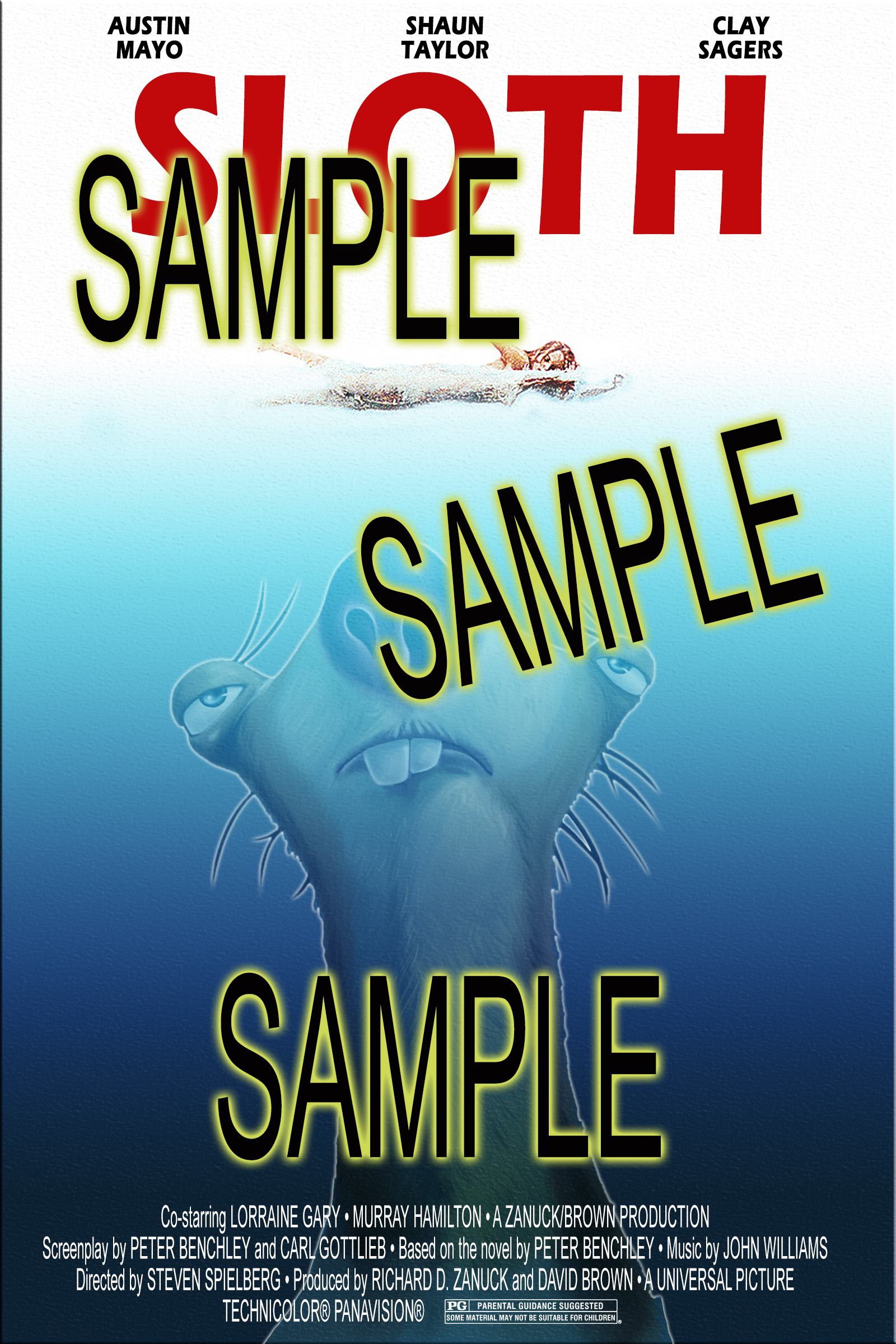
Photoshop Jaws Poster
- OBJECTIVE: Create an image in Photoshop using different tools and effects.
- Video: Adding Text, Stroke, Gradient, and Emboss
- You are recreating the Jaws movie poster, similar to the image below.
- Click the sample image below.
- Copy it and paste it into a new Photoshop document.
- Save the file to your H drive with the filename, yourlastname-jaws.
- Download the orignal jaws poster from the Google Drive below.
- The files are here: https://tinyurl.com/4cd7zvx2
- You can use sid or a different image of your choice to replace the shark.
- The only starter files you need are the orginal jaws poster and sloth if you are using it and not your own image.
- Open the Jaws Poster file in Photoshop. Drag and drop the file into your your Photoshop document.
- You will use the original poster to copy the swimmer from it to your file.
- Add text (names) at the top of the image. Use a similar font and color.
- Add a title at the top, trying to match the font and color of the sample image.
- Add a gradient to mimic water to the entire image.
- This is done with a rectangle and an effect applied to it.
- Cut out the sloth or an image you choose and place it below the swimmer.
- The image should have a stroke or outer glow around it.
- Add the movie credits at the bottom of the poster.
- Copy the following text for the credits at the bottom of the poster.
Co-starring LORRAINE GARY • MURRAY HAMILTON • A ZANUCK/BROWN PRODUCTION
Screenplay by PETER BENCHLEY and CARL GOTTLIEB • Based on the novel byPETER BENCHLEY • Music by JOHN WILLIAMSDirected by STEVEN SPIELBERG • Produced by RICHARD D. ZANUCK and DAVID BROWN • A UNIVERSAL PICTURE •TECHNICOLOR PANAVISION - Include a graphic for the rating. You can Google it and copy and paste.
- The files are here: https://tinyurl.com/4cd7zvx2
- When you are done, export the jpg version and email it to me. Use the Subject, Photoshop Jaws.
Feb 4
Make the following images using Photoshop and/or (Photopea if you're at home)
- Star Wars
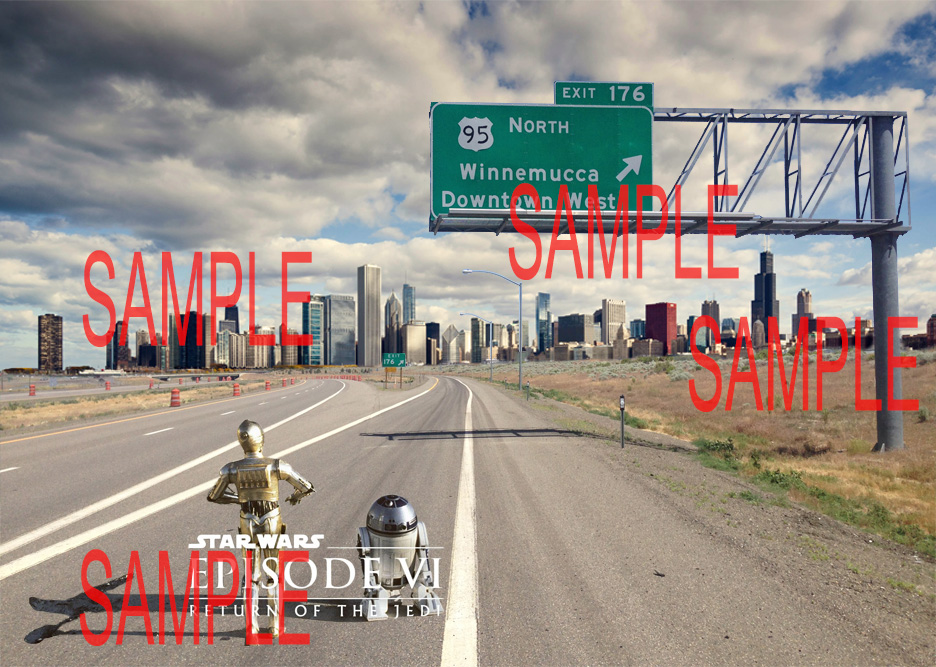
- This image is composed of three images:
- city https://tinyurl.com/2tsnrzf4
- starwars1 https://tinyurl.com/598cphmb
- winnemucca https://tinyurl.com/4rd9kpku
- They are also in the shared Drive: https://tinyurl.com/4cd7zvx2
- Download the images from to your H Drive.
- Each will be a different layer in the file you create.
- Open Photoshop.
- Click on the completed sample image below to open the full-size image.
- Right-click on the image and copy it.
- In Photoshop, click File New. If you copied the image correctly, Photoshop will know the dimensions of the image you are creating. Click OK.
- Paste (CTRL+V) the copied image onto the canvas in Photoshop.
- Save the file as a PSD file in your H Drive with the filename yourname_starwars.
- This image will be the lowest layer in Photoshop so you can use it as a guide.
- Lock this layer.
- Open the city image from your H Drive.
- Video: Editing City Image
- The video says to save in your 305 folder. We are using your H drive instead.
- Drag this to the image you just created and place it in a layer above the completed sample image. Do this by clicking and holding and then dragging the image from the current Photoshop tab to the yourname_starwars tab.
- Adjust the layer so they are exactly aligned.
- Remove the water but leave the cityskyline from this layer. Use whatever selection tools you prefer.
- When you are done, lock the layer.
- Video: Editing City Image
- Open the winnemucca image from your H Drive.
- Video: Editing Winnemucca Image
- The video says to save in your 305 folder. We are using your H drive instead.
- Drag this to the image you just created and place it in a layer above the completed sample image. Do this by clicking and holding and then dragging the image from the current Photoshop tab to the yourname_starwars tab.
- Adjust the layers so they are exactly aligned.
- Remove the sky but leave the road and the sign. The magic wand will work well for this. Remember to remove the sky from the framework of the sign. Use whatever selection tools you prefer.
- When you are done, lock the layer.
- Video: Editing Winnemucca Image
- Open the starwars1 image from your H Drive.
- Video: Editing starwars1 Image
- The video says to save in your 305 folder. We are using your H drive instead.
- Drag this to the image you just created and place it in a layer above the completed sample image. Do this by clicking and holding and then dragging the image from the current Photoshop tab to the yourname_starwars tab.
- Adjust the layers so they are exactly aligned.
- This image will take longer to cut out and you will need to use a variety of tools. Don't forget to keep the words and the shadow.
- Hide the layers so you can see the completed sample image and align your layers accordingly.
- Video: Editing starwars1 Image
- When you are done, export the jpg version and email it to me with the subject Photoshop Star Wars.
Feb 2
DUE: Forrest Gump
Jan 29-30
Make the following images using Photoshop and/or (Photopea if you're at home)
- OBJECTIVE: In Photoshop or Photopea (video) utilize various tools to recreate a given image.
- The explanation of the assignment can be viewed in here.
- Download from the "student_files" Google Drive
- Starter image files to download are available here.
- Save the folder in your personal H Drive.
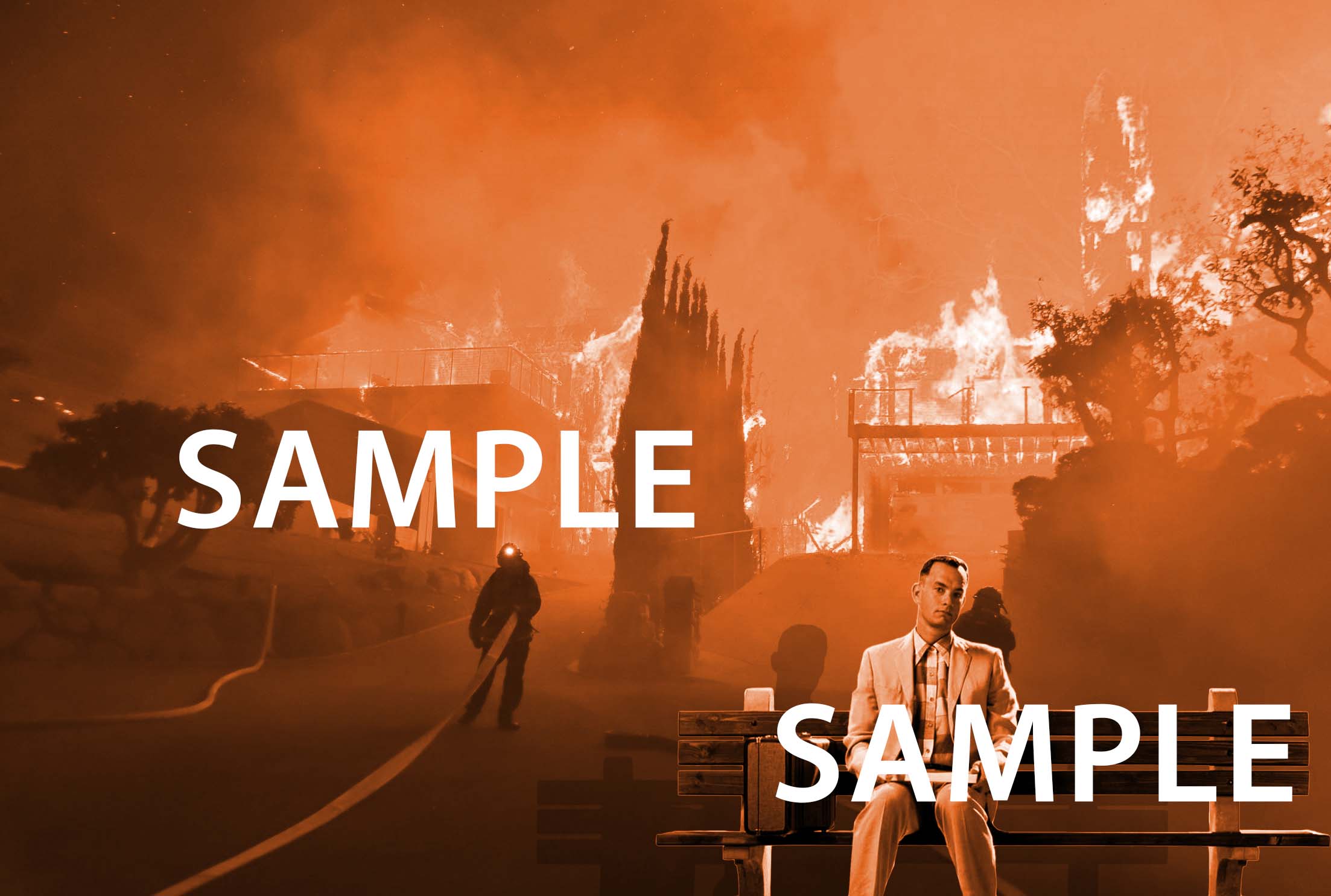
- Forrest Gump
- Demo Video
- Open Photoshop.
- Click on the completed sample image below to open the full-size image.
- When you are done, export the jpg version and email it to me with the subject Photoshop Forrest Gump.
- When you are done, export the jpg version and email it to me with the subject Photoshop Forrest Gump.
- Right-click on the image and copy it.
- In Photoshop, click File New. If you copied the image correctly, Photoshop will know the dimensions of the image you are creating. Click OK.
- Paste (CTRL+V) the copied image onto the canvas in Photoshop.
- Save the file as a PSD file in your H Drive with the filename yourname_forrest_gump.
- This image will be the lowest layer in Photoshop so you can use it as a guide.
- Lock this layer.
- Download the fire image from the Google Drive above to your H Drive.
- Open the image in Photoshop and drag this to the image you just created and place it in a layer above the completed sample image. Do this by clicking and holding and then dragging the image from the current PhotoShop tab to the yourname_forrest_gump tab.
- Adjust the layer so they are exactly aligned.
- Download the gump image from the Google Drive above to your H Drive.
- Open the image in Photoshop and drag this to the image you just created and place it as the topmost layer above the fire image.
- Cut out Forrest Gump.
- Use a variety of selection tools.
- Make sure you have the correct layer selected when you are trying to cut the image out.
- Your cuts must be precise. Use multiple tools and make sure you zoom in.
- Flip the image horizontally.
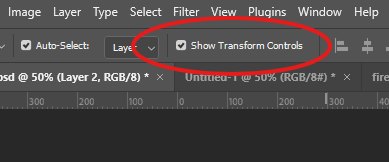
- This is easier when you have Show Transform Controls selected.
- This is easier when you have Show Transform Controls selected.
- Adjust Levels. This is in the Adjustments panel and will create a new layer.
- Only apply this to the gump image.
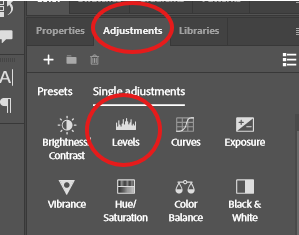
- Only apply this to the gump image.
- Adjust Hue/Saturation and apply this to all layers.
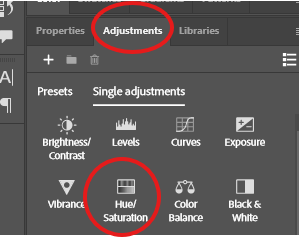
- Apply drop shadow. This is done through the Fx panel.
Jan 28
Missing assignments report
- Get from sub
Typing.com
- Type for 15 minutes at the beginning of the period.
- Remember to login with your school Google account, it tracks your time. If you are not logged into the class you WILL NOT receive credit.
1.8 Digital Citizenship and Cybersecurity Quiz
- You can retake the quiz in Google Classroom, if you received a low score. If you want to keep your score, you do not need to retake it.
Jan 27
1.7 Hacking Ethics
- Use complete sentences even if they are brief. Sentences begin with capital letters and end with a period. Type answers below the questions.
- 1.7.1 Hacking Ethics & Legality Check for Understanding
- 1.7.2 Hacking Ethics & Legality Connection
- 1.7.3 Penetration Testing Free Response
- 1.7.4 Reflection: Penetration Testing Connection
- 1.7.5 Hack the Pentagon? Free Response
- 1.7.6 Reflection: Hack the Pentagon Check for Understanding
- 1.7.7 Ethical Hacker Agreement
Jan 26
Conitnue awith CodeHS
- DUE: 1.5 Information Literacy
1.6 Creative Credit & Copyright Video
- Use complete sentences even if they are brief. Sentences begin with capital letters and end with a period. Type answers below the questions.
- 1.6.1 Creative Credit and Copyright Check for Understanding
- 1.6.2 Creative Credit and Copyright Free Response
- 1.6.3 Cite! Connection
- For the last one it does not have to be a formal citation you would use for and English paper. For example, this (Own work, from Sharp Photography, sharpphotography.co.uk) is the citation for this image (https://commons.wikimedia.org/wiki/File:Kalahari_lion_(Panthera_leo)_male_cub_4_months.jpg) at wikipedia.
- 1.6.4 Exploring Creative Commons Free Response
- 1.6.5 Respond: Creative Commons Free Response
- You need a brief description of each.
- 1.6.6 Task: Finding Images Free Response
- 1.6.7 Reflection: Why is Copyright Important?
_male_cub_4_months.jpg)
Jan 23
1.5 Information Literacy
- Use complete sentences even if they are brief. Sentences begin with capital letters and end with a period. Type answers below the questions.
- 1.5.1 Information Literacy Check for Understanding
- 1.5.2 Information Literacy Free Response
- 1.5.3 Effective Internet Searches Connection
- You can place the answer to each below the search or copy and paste the URL of your search results.
- 1.5.4 Evaluate the Source 1 Free Response
- 1.5.5 Respond: Evaluate the Source 1 Notes
- 1.5.6 Evaluate the Source 2 Free Response
- 1.5.7 Respond: Evaluate the Source 2 Connection
- 1.5.8 Hero Pig?
FINISH: 1.4 Privacy & Security Video
- Use complete sentences even if they are brief. Sentences begin with capital letters and end with a period. Type answers below the questions.
- 1.4.1 What is Data Privacy & Security? Check for Understanding
- 1.4.2 Privacy & Security Quiz Connection
- 1.4.3 How Strong is your Password? Free Response
- 1.4.4 How Strong is your password? Connection
- 1.4.5 Google Privacy Policy Search Free Response
- 1.4.6 Google Privacy Policy Search Example
- 1.4.7 Guess: Password List Example
- 1.4.8 Guess: Using an Algorithm Example
- 1.4.9 Guess: Brute Force
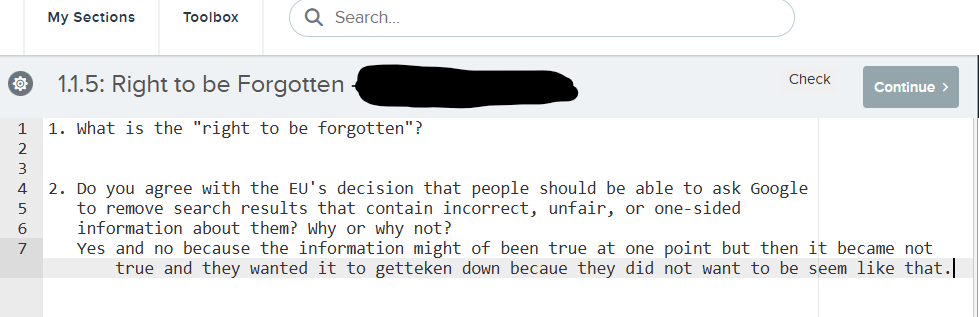
When asnwering questions, record your answer immediately below the question.
Jan 22
1.4 Privacy & Security Video
- Use complete sentences even if they are brief. Sentences begin with capital letters and end with a period. Type answers below the questions.
- 1.4.1 What is Data Privacy & Security? Check for Understanding
- 1.4.2 Privacy & Security Quiz Connection
- 1.4.3 How Strong is your Password? Free Response
- 1.4.4 How Strong is your password? Connection
- 1.4.5 Google Privacy Policy Search Free Response
- 1.4.6 Google Privacy Policy Search Example
- 1.4.7 Guess: Password List Example
- 1.4.8 Guess: Using an Algorithm Example
- 1.4.9 Guess: Brute Force
Jan 21
Typing.com
- Type for 15 minutes at the beginning of the period.
- Remember to login with your school Google account, it tracks your time. If you are not logged into the class you WILL NOT receive credit.
1.3 Internet Safety Video
- Use complete sentences even if they are brief. Sentences begin with capital letters and end with a period. Type answers below the questions.
- 1.3.1 Internet Safety Check for Understanding
- 1.3.2 Internet Safety Free Response
- 1.3.3 Scenario: School Stranger Free Response
- 1.3.4 Scenario: Vacation Pals Free Response
- 1.3.5 Staying Safe
Jan 20
Review missing work
Jan 16
From Jan 13 Unit 1 Google Drive: Complete in Google Classroom
- Watch Video: 01-15-26 Unit 1 Google Sending Email
- Many of you did this incorrectly and need to redo the assignment following the directions.
From Jan 13 Unit 2 Gmail Complete in Google Classroom
- Watch Video: 01-15-26 Unit 2
- Many of you did this incorrectly and need to redo the assignment following the directions.
CodeHS Unit 1
Jan 15
CodeHS Unit 1
Jan 14
Typing.com
- Type for 15 minutes at the beginning of the period.
- Remember to login with your school Google account, it tracks your time. If you are not logged into the class you WILL NOT receive credit.
CodeHS Unit 1: Digital Citizenship and Cyber Hygiene 1.1: Digital Footprint and Reputation
- Use complete sentences even if they are brief. Sentences begin with capital letters and end with a period. Type answers below the questions.
- Video 1.1.1 Digital Footprint and Reputation Check for Understanding
- 1.1.2 Digital Footprint and Reputation Free Response
- 1.1.3 Building a Positive Digital Footprint Connection
- 1.1.4 Right to be Forgotten? Free Response
- 1.1.5 Right to be Forgotten Free Response
- 1.1.6 What is your Digital Footprint? Example
- 1.1.7 Social Media Clean-up
CodeHS Unit 1: Digital Citizenship and Cyber Hygiene 1.2 Cyberbullying
- Use complete sentences even if they are brief. Sentences begin with capital letters and end with a period. Type answers below the questions.
- Video 1.2.1
- Cyberbullying Check for Understanding
- 1.2.2 Cyberbullying Free Response
- 1.2.3 Scenario: Student Ranking Free Response
- Only one option is not sufficient.
- 1.2.4 Scenario: Singled Out Free Response
- 1.2.5 Stopping Cyberbullying
Jan 13
Complete the following in Google Classroom
- Unit 1 Google Drive: Complete in Google Classroom
- Make sure you read ALL of the directions.
- Text for Doc.
- During my summer vacation, I went to Cocoa Beach, Florida with three of my friends. While I was there, I took introductory surfing lessons, played Frisbee, and went snorkeling. I tried many new restaurants on the pier and took daily walks on the beach. My friends and I went kayaking for the first time, and even though we got sunburnt, we had a great time. We also took a day trip to Disney World. It was an unforgettable vacation, and I hope I can go back to Cocoa Beach next summer.
- This assignment will autopost at the beginning of the period.
- Unit 2 Gmail: Complete in Google Classroom
- At the end of the lesson create a label titled Google Classroom. Do not delete it.
- This assignment will autopost during the period.
Jan 12
Since many are completely done with Unit 13, we are picking up the pace a little. Do not proceed to the next Unit until tomorrow.
DUE 13.6 Packets and Protocols
DUE 13.7 The Impact of the Internet
DUE 13.8 Computing Ideas Completed
13.9 The Internet Quiz
- Unit Quiz 13.9.1 The Internet Quiz
- You can retake the quiz in Google Classroom, if you received a low score. If you want to keep your score, you do not need to retake it.
Jan 9
DUE CodeHS 13.4
DUE Parent syllabus verification
DUE: 13.6 Packets and Protocols
- Video 13.6.1 Packets and Protocols
- Check for Understanding 13.6.2 Packets and Protocols Quiz
- Resource 13.6.3 Passing Notes
- Connection 13.6.4 How the Internet Works
- Free Response 13.6.5 The Story of the Internet
DUE: 13.7 The Impact of the Internet
- Video 13.7.1 The Impact of the Internet
- Check for Understanding 13.7.2 The Impact of the Internet Quiz
- Connection 13.7.3 What is the Digital Divide?
- Free Response 13.7.4 What is the Digital Divide?
- Answer each question below the provided question.
- Survey 13.7.5 Mindsets
Jan 8
DUE CodeHS 13.3
Typing.com
- Type for 15 minutes at the begnning of the period
- Make sure you log in with your school account.
- Please try to type correctly, it is helpful.
CodeHS 13.4 DNS
- Video 13.4.1 DNS
- Check for Understanding 13.4.2 DNS Quiz
- Connection 13.4.3 How Does DNS Work?
- Free Response 13.4.4 How Does DNS Work?
- Answer each of the questions on its own line. You should be able to answer each in one sentence. Which means two sentences at a minimum.
- Badge 13.4.5 DNS Badge
13.5 Routing
- Video 13.5.1 Routing
- Check for Understanding 13.5.2 Routing Quiz
- Free Response 13.5.3 Redundancy
- Answer each question on one line with a maximum of one sentence.
- Connection 13.5.4 Route Tracing
Jan 7
DUE CodeHS 13.1
DUE CodeHS 13.2 Internet Hardware
- Video 13.2.1 Hardware of the Internet
- Check for Understanding 13.2.2 Internet Hardware Quiz
- Connection 13.2.3 The Internet is in the Ocean
CodeHS 13.3 Internet Addresses
- Video 13.3.1 Internet Addresses
- Check for Understanding 13.3.2 Internet Addresses Quiz
- Free Response 13.3.3 The Need for Addresses
- Check for Understanding 13.3.4 4-bit Addresses
- Free Response 13.3.5 IPv4 vs IPv6
- Please provide only one sentence for each statement/question.
Jan 6
Seating Chart
DUE: Pretest
- Take the pretest in Google Classroom
- Must be done at school.
- Do not look up answers.
CodeHS Unit 13.1 Intro to the Internet
- Video 13.1.1 Welcome to the Internet
- Check for Understanding 13.1.2 Welcome to the Internet Quiz
- Free Response 13.1.3 The Internet and You
- Your response should be at least two sentences and follow common rules of English.
DUE: Student Syllabus Verification in GC
Jan 5-6
Course requirements/expectations
- Syllabus: parents can sign ther verfication or email me at respinola@hcsdnv.com.
Assignment:
- Complete registration for websites below.
- Student Syllabus Verification
- Complete in Google Classroom
- You must sign in with your Google Classroom account.
- You should have received and email inviting you to the classroom.
Join Your period in Code HS.
- You should have been added through Google Classroom.
- Sign in with your school Google account.
Join Typing.com (https://www.typing.com/)
- You should be automatically added to typing.com through Google Classroom.